Claim Your Account
Using Microsoft Self-Service Password Reset (SSPR)
Audience: Chicago State University students, faculty, staff, and authorized users
Portal: https://passwordreset.microsoftonline.com
Support: CSU Helpdesk | bhelp@csu.edu| 773-995-3963
Purpose
This guide explains how Chicago State University users can:
- Claim their CSU account
- Reset a forgotten password
Password Reset/Account Claim Steps
Step 1: Go to the Microsoft Password reset Portal
Open a web browser and go to: https://passwordreset.microsoftonline.com/
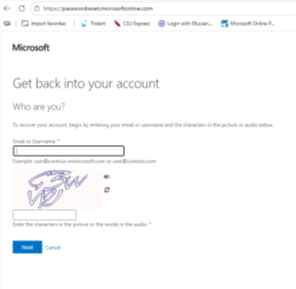
- Enter your CSU email address or username
- Complete the characters (CAPTCHA) shown on the screen
- Select Next
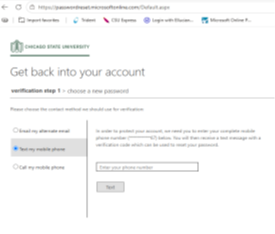
Step 2: Verify Your Identity
Choose a verification method (based on what you have registered):
- Text message (SMS)
- Phone call
- Microsoft Authenticator app
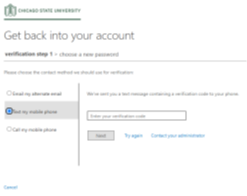
Follow the prompts to receive and enter your verification code.
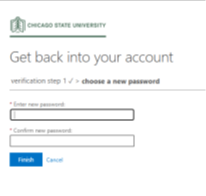
Step 3: Create a New Password
Enter a new password that meets CSU requirements:
Password guidelines typically include:
- At least 8 - 12 characters
- Mix of uppercase and lowercase letters
- At least one number
- At least one special character
Confirm the new password and select Finish.
Step 4: Sign In with Your new Password
Return to your CSU services (email, portal, Team, etc.) and log in using your new password.
If Your Account is Locked
Follow the same steps above. Once your identity is verified and password is reset, your account will be automatically unlocked.
Security Reminder: Do not sent your current password, new password, or verification codes through email, chat, text message, or voicemail.
To claim your account, reset password please Click here
 ©
Chicago State University
©
Chicago State University  All Rights Reserved
 (773) 995-2000